

You’ve probably noticed how often AI is mentioned in everyday life. Chatbots claiming a boost in productivity, healthcare apps trying to diagnose medical conditions and security tools with “faster than ever” threat detection.
All these AI solutions have one thing in common: They most likely don’t run locally on the average consumer’s device. Instead, they send data to cloud servers for processing, often without the user even realizing it. This creates an issue, most people don’t realize: If the service isn’t built with privacy in mind, their data could be at risk.
Table of Contents
How cloud-based AI chat works
The typical interaction with an AI chat model starts with a prompt. This could be a question, a research request or an image generation task. The prompt is sent to the server for processing and an answer is returned. The processing on the server is called “inference” and requires significant computational resources and therefore money.

Large language model inference itself typically doesn’t raise privacy concerns. This process follows a clear cycle: input is processed to become output and is discarded afterwards. However, the services offering these models may include features or terms that influence how personal data is managed. These changes can come as part of cost reduction measures, service improvements or feature development.
How cost reduction threatens user privacy: Backend Logging
Service providers can lower ongoing costs by monitoring service usage and logging user activity to prevent overuse or abuse of the service. This practice can introduce privacy concerns as these logs can contain sensitive information and personal details.
| Data Collection Type | What might be contained | Why it might be collected |
| Metadata | Prompt & Response timestamp / size IP address, browser / hardware identification | Rate limiting, performance diagnostics |
| Prompt & Response | Exact user input & model response, including potentially sensitive information | Debugging issues, improving service quality, abuse detection |
| Usage statistics | Total tokens processed, number of requests per time interval | Collection of service metrics for cost-control & capacity planning |
Example: What a single log can say about you
Let’s look at an example for log entries that may be generated during an interaction. The interaction is as follows:
- A person has booked a vaccation and is wondering why the payment status is still “pending”. They supply the invoice to the AI model for analysis and an explanation. The service processes the supplied information and returns a response.
The log entries below have been created with the help of AI, because I don’t have access to real log files of a cloud-based service provider. They may not look the same for the provider you are using and should only be viewed as possible examples.
Example: Metadata
Metadata logs can contain general information about the interaction, such as account identification, source ip address, and user agent information.
{"timestamp": "2025-04-12T09:15:44Z", "client_id": "user_9d1e", "ip": "123.123.123.123", "user_agent": "Safari/17.0", "request_type": "text-generation"}
IP Address: The IP address that made the request
User Agent: The browser or application used during the interaction
Timestamp: The exact time of the interaction
Example: Prompt and Response
Prompt and response logs contain information about the interaction, including the actual user prompt and model response. They can also contain information about files that were uploaded to the service.
User prompt: Text
{"client_id": "user_9d1e", "request_id": "cruise-2a3b_prompt", "prompt": "My family’s trip to Bali is booked, but the payment shows ‘pending’. I’ve had two card declines last month — is this normal? I need to know before my vacation starts in June.", ""timestamp": "2025-04-15T16:11:45Z"}User prompt: File upload
{"client_id": "user_9d1e", "request_id": "cruise-2a3b", "file_name": "bali_trip_payment.pdf", "file_size": "1.2MB", "content_type": "application/pdf", "upload_timestamp": "2025-04-15T16:12:09Z", "sensitive_fields": ["card_last4", "booking_id", "cruise_destination", "billing_information"], "redaction_status": "minimal", "pii_detected": true}Prompt text: The prompt sent to the server
File name: The name of the file uploaded to the server
Sensitive fields: Information about sensitive information within the uploaded file
Model response: Text
{"request_id": "cruise-2a3b_response", "response": "Payment ‘pending’ means your Bali booking is processing — this is normal. Card declines can happen if: 1) Your card (ending in: 1234) is temporarily blocked 2) The cruise line has security checks. Here’s what to do: \n\n1️⃣ Check your bank app for ‘pending’ transactions \n2️⃣ Contact cruise support *before* the 24-hour window ends \n\n⚠️ **Critical note**: Never share card details publicly.", "response_tokens": 198, "sensitive_fields_in_response": ["payment_status", "card_last4"], "redaction_status": "partial"}Response text: The response sent back from the server
Credit card information: The last 4 digits of the credit card used for the purchase, as mentioned in the uploaded file
Example: Usage statistics
Usage statistics logs can contain additional information that the service provider may find useful for broader reporting tasks. These can be useful to figure out times of high demand, average chat length or most used AI model.
{"request_id":"cruise-2a3b","model_version":"v4.1.0","log_timestamp":"2025-04-15T16:18:42Z","used_tokens":842,"previous_chat_length":8939}Timestamp: The exact time of the interaction
Previous chat length: The amount of tokens used in this session
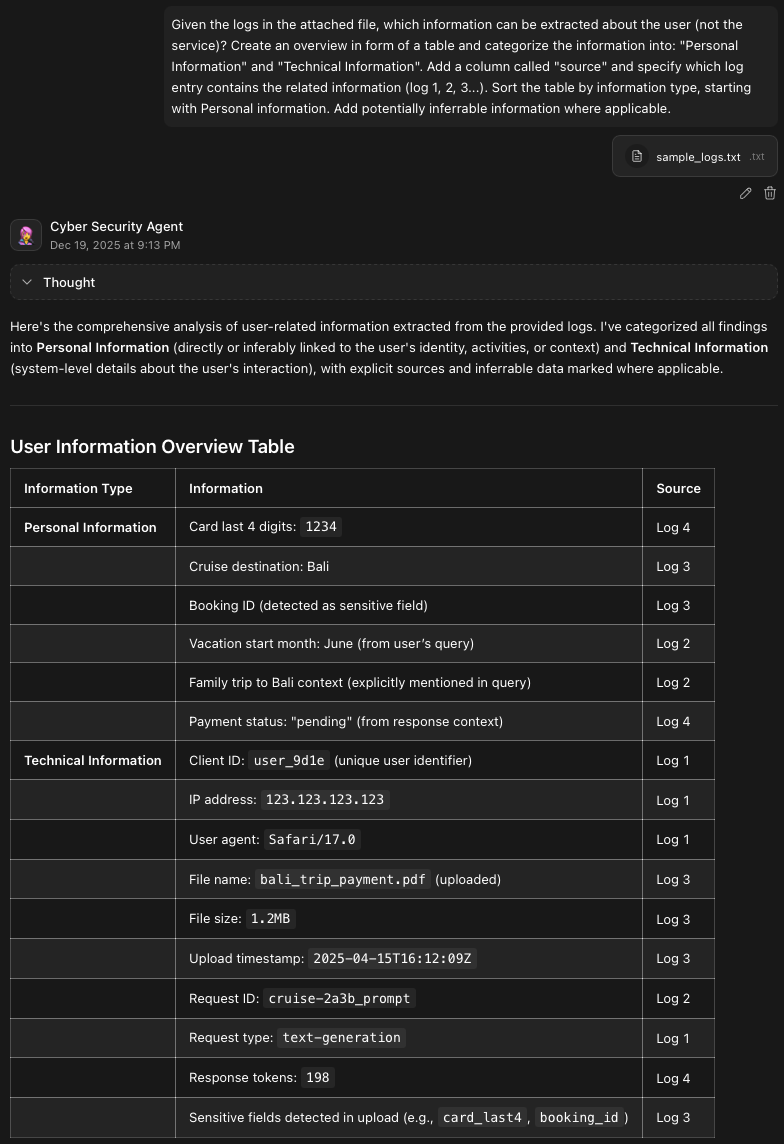
Example: Information aggregated from logs
The table below shows an aggregated overview of all the information available in just this one example interaction.
| thorbengilles | Information | Source |
|---|---|---|
| Personal Information | Card last 4 digits: 1234 | Log 4 |
| Cruise destination: Bali | Log 3 | |
| Booking ID (detected as sensitive field) | Log 3 | |
| Vacation start month: June (from user’s query) | Log 2 | |
| Family trip to Bali context (explicitly mentioned in query) | Log 2 | |
| Payment status: “pending” | Log 2 | |
| Technical Information | Client ID: user_9d1e (unique user identifier) | Log 1 |
| IP address: 123.123.123.123 | Log 1 | |
| User agent: Safari/17.0 | Log 1 | |
| File name: bali_trip_payment.pdf (uploaded) | Log 3 | |
| Upload timestamp: 2025-04-15T16:12:09Z | Log 3 | |
| Response tokens: 198 | Log 4 | |
| Sensitive fields detected in upload (e.g., card_last4, booking_id) | Log 3 |
While a single log may not reveal a large amount of private information, log aggregation can unintentionally show patterns in conversations that users might not expect to exist, such as repeated travel plans or financial details across multiple sessions.
Fun fact: The initial version of the table above was created by an AI tool running locally on my machine. The entire analysis took less than two minutes. All I had to do was to check for accuracy.
Another privacy pitfall: Training on user data
Developing language models requires vast amounts of high quality text-based data. While the internet contains of lot of text-based information, the supply is limited and potentially getting worse due to AI generated content being used on a lot of websites.
User input can be a valuable source of fresh data for LLM training as it has rarely been previously generated by AI. This however creates a privacy issue, as personal or confidential information may end up in the training data, even if automated systems attempt to anonymize the contents before training.
Take this study from 2021 as an example: Extracting Training Data from Large Language Models
Researchers were able to exfiltrate detailed information about individual people that was used for training by using specifically crafted prompts. The exfiltrated data included names, phone numbers, addresses and social media accounts (6.3 – Examples of
Another example – Amazon: Amazon’s internal documents warn employees not to use generative AI models for work
Amazon developers used ChatGPT to boost productivity. This caused an Amazon lawyer to issue an internal warning as there had been instances of ChatGPT responding with code that looked similar to internal data.
It’s not a bug, it’s AI friendship
Many AI Chat services try to introduce new features to make conversations more personal. Capabilities like emotional tuning and memory-based responses collect and store data from user prompts to refine interactions and customize the personality of the AI agent to the users liking.
According to a study published by Common Sense Media, 33% of teenagers in the US already use Chat AI for social interactions or relationships. They also tend to prefer Chat AI over real friends for serious conversations. 24% of teenagers claim to have shared personal information, such as names, locations or personal secrets with the service.
Common Sense Media Study: Talk, Trust, and Trade-Offs: How and Why Teens Use AI Companions
This creates an inherent risk as the amount of personal or confidential information available to a service grows on a daily basis and with each interaction.
Conclusion
Cloud-based AI chat services process user data through remote servers. This creates a privacy risk as sensitive details may be stored in logs or used for model training. If you need to use cloud-based AI, think about input data as public knowledge to re-evaluate if your prompt is safe to send. Additionally, it’s always a good idea to read the privacy policy of the service you are using.